Set up a factory plugin
Choose the plugin that sends issues, email or alerts to a station, connects a chat to a manager, or makes this factory available in an assistant.
Use a factory plugin when you want an issue, message or alert to reach a particular factory. For example, a new GitHub issue labelled codebook can open a story at your Payments triage station. You enable this in CodeBook; the person filing the issue installs nothing.
If you want the Factory pane or /factory command on your computer, install the Claude Code plugin instead. If you use ChatGPT, connect your Bookbag account. Those clients can work with more than one factory under your own permissions.
Pick a connection
| Where work starts | Tile to open | Where it goes |
|---|---|---|
| A labelled GitHub or GitLab issue | GitHub Issues or GitLab Issues | A story at the chosen station. CodeBook can comment back on the issue. |
| A Jira project or Linear team | Jira or Linear | A story, optionally filtered by label, with progress sent back as comments. |
| An inbound mailbox | Email in | Mail from verified, listed senders opens stories or adds replies. Outbound email is optional. |
| Zapier, n8n or a script | Webhook | A POST with a title opens a story at a station. |
| A production incident | Sentry, Datadog, PagerDuty and others | An eligible incident opens a story; production watch can also pause affected work orders. |
| A team conversation | Slack, WhatsApp, Microsoft Teams or Telegram | Messages reach a workflow manager. Replies return to the originating conversation. |
| A person working in an assistant | Claude, ChatGPT and other MCP clients | The person signs in with Bookbag at https://app.codebook.work/mcp and sees the factories they may access. |
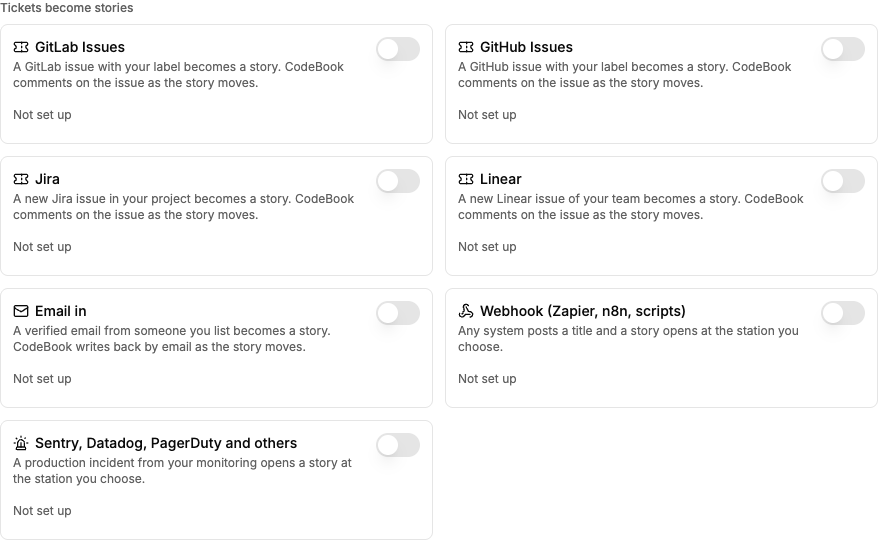
Switch one on
- Open the factory that should receive the work. Go to Factory settings → Plugins. A workspace owner or admin configures the integration. For ticket intake, prepare a workflow with a station where new stories belong. For chat, assign and enable the workflow's manager first.
- Find the tile under Tickets become stories, Talk to the manager, or Connector. Switch on an unconfigured tile to open its form. Cancelling before saving leaves it off.
- Give the connection a name you will recognize, such as
Payments triage. If prompted, pick the Workflow and Station new stories land at. An unavailable workflow can mean it has no manager or no attached repository of the selected host. - Fill in the provider settings using the guide above, then choose Save and switch on. Copy any generated address and one-time credential before closing the dialog. Paste credentials into their named setup fields, never a story or a manager chat. Some providers, such as Linear, give you a signing secret only after you register the address; finish that second step before expecting deliveries.
- Under Set up in this factory, find the named connection and choose Test. Read each result: a credential can pass when no event has arrived. The GitLab test can also repair the repository's hook subscriptions. Testing does not send a sample chat message or open a story.
- For an end-to-end check, send one clearly named example from an authorized test project or sender. Check the selected workflow for that specific story or look for a reply in the original conversation. Confirm the connection's usage or last event changes. Use a test workflow where creating a story may start a worker.
Change, pause or remove it
Use the switch on the named connection to stop it. Where Add appears, you can keep separate connections for different projects or workflows. Set up shows saved settings; stored secrets aren't shown again. Leave an editable secret blank to keep it. Some connections, including Slack credentials, must be replaced rather than edited.
Where Remove is offered, type the connection's exact name. A generic webhook is different: switching it off permanently revokes its token. Create a new webhook and update the sender if you need it again. Monitoring intake and the personal MCP connector have switches rather than a Remove button. The personal connector is on by default; turning it off hides this factory from that connector. Restore access from CodeBook on the web.
If a test passes but nothing arrives, check the source's delivery history, the destination workflow, the enabled state, the sender or label filter, and whether the person who configured it still has access. If you see Still needs, finish those fields. Use the provider-specific checks before replacing credentials.